Saturday, February 22, 2014

Tutorial: Create Unofficial Midnight Commander package for Debian 7.x

This is a quick hack on how to create debian package using Midnight Commander as an example. The Midnight Commander version that I am using here is MP version. The MP version is without glib dependency.

Midnight commander MP version get from here.
Update 2023: older link above is not exist anymore. Try this link.


I am using version 4.1.40pre9.

$ tar xzvfp mc-4.1.40-pre9.tar.gz
...
cd mc-4.1.40-pre9/
mc-4.1.40-pre9$ ./configure --prefix=/usr

checking whether make sets ${MAKE}... yes
checking for gcc... gcc
...

mc-4.1.40-pre9$ make
mc-4.1.40-pre9$ make DESTDIR=/tmp/mc install
mc-4.1.40-pre9$ cat > control <<-EOF
Package: mcmp
Priority: optional
Section: utilities
Installed-Size: 45
Maintainer: fuyichin <fuyichin@gmail.com>
Architecture: i386
Version: 4.1.40-pre9
Description: midnight commander
this is more powerful version without glib.
EOF

Create the debian package:
mc-4.1.40-pre9$ install -d /tmp/mc/DEBIAN
mc-4.1.40-pre9$ install control /tmp/mc/DEBIAN/.
mc-4.1.40-pre9$ dpkg -b /tmp/mc mc-4.1.40pre9.deb
mc-4.1.40-pre9$ ls mc-4.1.40pre9.deb
mc-4.1.40pre9.deb

mc-4.1.40-pre9$ sudo dpkg -i mc-4.1.40pre9.deb

Thursday, February 20, 2014

Facebook to acquire WhatsApp in USD16 billion

Finally WhatsApp is ready to sell for a price. In the 16 billion deal, 4 billion are in cash. According CNET WhatsApp monthly active users more than Facebook, in terms of growing rate since they start up. This is not truly fair comparison as both company started at different time. In simple word, WhatsApp is growing fast, For Facebook, WhatsApp is rival. By acquiring WhatsApp, Facebook increase their user base and one thing less to worry about.


Photo from flickr

Does WhatsApp has a business model? Yes, the first year is free, but the subsequence subscription fee is USD1 per year. WhatsApp is just a small size company with 55 employees now. WhatsApp has more than 400 million monthly active users.

Last year there was a rumour that Google and WhatsApp in talk of acquisition, but WhatsApp has denial that (refer here Won't sell-out to Facebook or Google: WhatsApp). WhatsApp never need to worry about money, they were funded 8 million by Sequoia Capital, should be enough for them to operate for some time.

There is a story of how Koum and Acton co-founded Whatsapp. Koum and Acton working in Yahoo before the co-founded WhatsApp. Both of them applied job in Facebook but rejected. Read the story here.

Note:
Rumor saying that Google offered 10B for WhasApp.

Saturday, February 15, 2014

Tutorial: Install MySQL with Homebrew on OS X

Normally this is how I install MySQL.

1. Download MySQL binary
2. Extract the binary, I put it at /usr/local
3. Create database
4. Set root password
5. Startup and shutdown

The instructions are for unix like system, even for Mac OS X.

With homebrew, it could be event easier. (Note: Homebrew is a third party software management tool for Mac OS X)

1. Make sure homebrew is working.
$ brew update
$ brew doctor

2. Install MySQL
$ brew install mysql

(mysql command will be installed in /usr/local/bin directory)

3. Create database
Make sure /usr/local/bin is in your PATH environment.
$ mysql_install_db [--basedir=/usr/local/Cellar/mysql/5.6.15]

Without the base dir, the system response with error can not find my.cnf file. The version number of the mysql could be different in your system, mine is 5.6.15.

4. setup my.cnf
$ vi /usr/local/Cellar/mysql/5.6.15/my.cnf
...
# These are commonly set, remove the # and set as required.
basedir = /usr/local/Cellar/mysql/5.6.15
datadir = /usr/local/data
port = 3306
server_id = 1
socket = /tmp/mysql.sock
...

This is my configuration, you might have your own settings, especially for datadir.

5. Startup and shutdown
$ mysql.server start
Starting MySQL
. SUCCESS!


$ mysql.server stop

6. Create root password
$ mysqladmin -u root [-h localhost] password 'new-password'

Once you have your root access to mysql, you can create other users and databases. Note: You need to start mysql server to change the root password.

Saturday, February 08, 2014

Upgrade PHP with homebrew on OS X

I am new to homebrew, whatever I shows here is just my experience with homebrew, might not be the best practise.

Homebrew is similar with Fink and MacPorts, is just a software management tools to install third party software, especially open source software on Mac OS X. It install the software into /usr/local directory, which will not replace your system software.

Update to the latest system if possible. Later system may have a better support, homebrew just download the binary if it is available on your system. Which save you time. I use homebrew on my older system, it download and compile the software, I encounter error and retry and retry...

These are the steps to update php with brew, I refer the steps from the internet:

$ rm -rf ~/.pearrc # remove existing PHP/PEAR config files
$ brew update
$ brew upgrade
$ brew tap homebrew/dupes
$ brew tap josegonzalez/homebrew-php
$ brew install freetype jpeg libpng gd zlib openssl unixodbc

$ brew install php55 # or php53

It takes a few minutes if binary is available.
I experience some issues on my OS X 10.6.2 with 32 bits CPU. I have php 5.3.1 on my system, but the PHP composer need 5.3.2 or above.


Issues with freetype

$ brew install freetype
builds/unix/ftsystem.c:246: error: 'Cannot_Open_Resource' undeclared (first use in this function)
builds/unix/ftsystem.c:369: error: 'Cannot_Open_Stream' undeclared (first use in this function)

Manual compile freetype works! From http://www.freetype.org/download.html. I compile freetype-2.5.2:

$ cd freetype-2.5.2
$ ./configure
$ make
$ sudo make install

$ brew install php53 --ignore-dependencies freetype --without-apache

Please take note, the php I installed doesn't works with Apache web server. Finally I have my PHP 5.3.28.

$ php -v
PHP 5.3.28 (cli) (built: Jan 22 2014 18:27:26)
Copyright (c) 1997-2013 The PHP Group
Zend Engine v2.3.0, Copyright (c) 1998-2013 Zend Technologies

Friday, January 24, 2014

30 years of Mac

This year mark the 30 years for Apple Macintosh.

When Apple first launch Macintosh, it starts with the 1984 commercial, which mimic the George Orwell's novel, 1984. In George Orwell's 1984, the people are controlled by the 'Big-Brother'. George Orwell has another novel named Animal Farm, which sounds more interesting to me.

In the 1984 commercial, the ads says, "why 1984 wouldn't be like 1984". At that time, the PC industry was lead by IBM personal computer.

Apple Macintosh is a big leap for personal computer, it features using of mouse pointer and graphic user interface on a 128k ram computer!

Mac OS System 1

Mac OS X 10.9 Mavericks

There is an engineer, Jeff Keacher use his 27 years old Macintosh plus to connect to the Internet. It is very slow, it takes a few minutes to load a html page, but it still "works". You can read how he do it here.

The Mac hardware and software are so much different from the original Mac. Some of the look-and-feel of Mac OS has not been changed, for example the menu bar of the application is always on top of the desktop not on the application windows (as in Microsoft Windows system).

What I can say is classic remains there!

Happy Birthday Mac!

Tuesday, January 14, 2014

U Mobile UMI package 2014

U Mobile just changed their UMI package:

UMIdatavoice(max)SMS(max)
UMI 18250Mb25mins(50)25mins(50)
UMI 281Gb50mins(100)30mins(60)
UMI 381Gb150mins(300)30mins(60)
UMI 482Gb100mins(200)30mins(60)

What have changed? Take UMI 28 as example, data increase from 500Mb to 1Gb, but voice has reduce from 100 minutes to 50 minutes, the maximum accumulated voice minutes has been reduced as well.

Friday, December 27, 2013

Apple 12 days of Gifts 2013

12 days of Gifts is a mobile app from Apple, it notify you free gifts everyday since 26 December 2013 to 6 Jan 2013. The free gifts could be an app or iTunes songs. You still can download the free gifts without the app, the app just to help you to get the free gifts much easier.


The first day gift is Justin Timberlake's live performance album.

How to get it? You need iOS 7, download 12 days of Gifts from iTunes app store, is free. The app will notify you a new gift everyday, enjoy yourself till 6 Jan 2014.

Merry Christmas and Happy New Year 2014!

Saturday, December 21, 2013

Maxis Hotlink Free Internet Prepaid 2013

This is quite an innovative plan for free mobile Internet.

Hotlink is Maxis prepaid. It came out with a new prepaid with free Internet. How can it be free? You can not surf in full speed, only at 64kbps. What you can do with 64kbps? Whatsapp, WeChat, facebook etc. There are review saying that Waze can be used as well, but I have to try out the speed performance. (Note: You can subscribe to unlimited Waze for RM1 per day)

You still need to top up the prepaid card, but there is a 50 days of de-active period that you still can use the Internet surfing.

Active and de-active period. After you top up, is the active period. Active period depends on how much you top up, example RM5 active for 5 days. After active period end, you can receive call and sms, but not call out or sending sms, this will be the de-active period. This Hotlink free Internet has a 50 days of de-active period, you can not send SMS, but you are still able to access to Internet. That means you can send Whatsapp with these 50 days without top up.

 [ Top up | -- active period -- | -- de-active period (50days) -- | card expired ]

To prevent the card from expired, you have to top up before de-active period end. Once the card expired, you can not top up anymore. During de-active period, your balance will be freeze, but it will be carry forward to the next top up.

Cost for free mobile Internet. Ideally with 5 active and 50 de-active period, you only need to top up 7 (365/55) times x RM5 per year. Which cost RM35 per annual for 365 days free surfing. The RM35 will still stay in the account balance. Compare with Super Long Life 365 and Validity 365. These are long validity period which cost about RM30 a year. The Hotlink free basic Internet doesn't sounds that bad.

Auto top up. Most people will forgotten to top up every 55 days (so do I). You can subscribe a monthly auto top up, check the detail here.

Subscribe full speed Internet plan. What do you do will all these balance? You still can subscribe to a full speed data plan like RM2 for 100Mb Daily (not auto renew), detail check here. This package is for light users who want to save money but still want to access Internet.

How to get it? You can purchase the new card or existing Hotlink users can change their current plan to this Free Internet Plan. Hotlink Extra/Basic/SMS/Talk Plan/ Hotlink 2.0 & 3.0 can change to Free Internet Plan, excepts Hotlink Youth Club, Hotlink Campus Edition, Hotlink Broadband, Hotlink Sabah/Sarawak/Terengganu/Kelantan Plan. (Wow! I didn't notice there are so many Hotlink)

The key will be the 64kbps. Will 64kbps enough for Whatsapp and facebook? I will let you all know if I have the change to try out.

Saturday, December 14, 2013

How to share location and pick up with Waze 2013 December

Waze is a GPS navigation software available on iPhone iOS and Android system. Waze just updated their mobile apps with a new interface, which looks cleaner and easier to access.

Remember to turn off (menu lower right button) before exit

Starts with very simple 4 buttons menu:
1. Navigate to target location.
2. Setting, foursquare check-in etc.
3. Send ETA, share location.
4. Inbox

Note:
Turn off Waze before exit on the menu power button.

Tutorial. This simple tutorial just shows you how to share your location or request a location of a pick up point.

Share location. There are a few ways to share location with Waze.

1. From (any point on) the Waze map, press and hold on the location (for sharing) until a marker pop up. Click info icon, then the "More" icon at the bottom, Send a Location. You can share the location with mobile text or email. The share url will be something like this http://waze.to/hw753xdwhx.

1. point the location to share

2. Click more, Send a Location.

2. Share my current location (or destination). Click the lower left button, menu pop up. Choose Send ETA > Send a location > My location (or My Destination).

To pick up someone. Send a pick up request, once the other side authorize your pick up, you will be notified. To send a pick up request, swipe the lower left button to the right, click "Send location request".


Send ETA. While you driving to the pick up, you can send ETA, the receiver can track you on the road, estimate when you will be arrived. The tracking will off after you turn off Waze, or you can turn off manually by a simple 2 clicks action.

To send ETA, click the lower left button, a menu pop up, click Send ETA (refer to the picture below), Share Drive, with mobile text or email.

Turn off ETA following. When someone following your ETA, the Waze menu button turn yellow color. Number showing followers who is following your ETA now.

iOS Waze 3.7.7 shows ETA following

To terminate following just click on the red button above Stop Nav will do.

Monday, December 09, 2013

Digi Super Long Life 365 2013

Super Long Life 365 package cost RM30 (as for now) to validate you number for 365 days. The RM30 will be deducted from the balance and will not converted to talk time.

Digi prepaid has 3 choices, best, easy and smart. Best for call, easy for internet, smart for both.

The confusion part is there are 2 best plan. One is the old DiGi Best Prepaid Hit RM1, another 1 is New Digi Best Prepaid.

The new Digi best prepaid is take effect on December 2012.

To check current plan:
*128*1*4#
"DiGi Best Prepaid Hit RM1" (old)
"New DiGi Best Prepaid" (new)
(There may be some older prepaid package, but I have no idea what will be the package name)

Check is super long life 365 is available for you: *128*1*7#, reply 3 (Super Long Life):
1 RM5 (30 days)
2 RM30 (365 days)

The super long life 365 is not with the DiGi Best Prepaid Hit RM1 anymore, you must upgrade to "New DiGi Best Prepaid" to enjoy the service.

How to subscribe after switch to New DiGi Best Prepaid?
To activate DiGi Super Long Life via *128#:
Step 1: You must have at least RM35 in your account. (*126# check balance)
Step 2: Dial *128# and then press call.
Step 3: Reply 1 for My Account.
Step 4: Reply 7 for Talktime Services.
(You can use the shortcut code to dial, but since the menu may change, You might choose the wrong option)
Step 5: Reply 3 for Super Long Life.
Step 6: Reply 2 for Super Long Life RM30 (365 days).
* In 2012. There was only 1 option. Reply 1 for Super Long Life 365.
Step 7: Press 1 to confirm that you have selected RM30.00 with 365 days validity.

Tuesday, December 03, 2013

Backup mobile phone data

I heard 2 cases of phone lost recently. One backup the data, the other one just lost the precious photos on the phone. I always remind my friends:

Backup your data on the mobile phone!

Backup everything
How? The easiest way is backup everything with the desktop software. For iPhone you can sync all the data to iTunes software. I suggest do it everyday, just connect your iPhone to the desktop PC iTunes software, click the sync button. At the same time it will charge your phone.

Even old Nokia phones has Nokia PC Suite, or the later version call Nokia OVI Suite (or Nokia Suite). Sony Ericsson has a PC Suite, as well as Android. I have not used the Android PC Suite before.

I bet most normal users who doesn't know how to backup the mobile phone data, do not use any software that I mention above. I suggest to backup to the Internet cloud, I will show you how.

I just choose to backup contact list and photos as an example.

1. Contact (or address book). Link your contact to the Internet, for example Gmail contact. Android is Google friendly, it should automatically sync to Gmail contact.

iPhone contact to Gmail
Connect to gmail using CardDAV. Google has a support page on how iOS sync gmail contact. Different version of iOS may have some minor different in configuration.

iPhone > Settings > Mail, Contacts, Calendars > Add Account... >

Choose any prefer service

Choose an account and follow step by step will do.

Then set Contacts default account to Gmail or the service name you set above (not On My iPhone), so all your new added contact info goes into cloud service and not on local iPhone.

iPhone > Settings > Mail, Contacts, Calendars >

Set default account to Gmail.

2a. Photos to Dropbox. Most users (include Android and iPhone users) should be able to sync photos to Dropbox. You must have a Dropbox account (free register) and you need to connect your phone to a desktop (or notebook to do that).

(iPhone users can turn on iCloud sync in step 2b. You don't need a PC to do that.)

Once you have installed the Dropbox software, connect the phone to the desktop. A screen will display, just click import will do. Select auto import, so your photos will be sync to Dropbox automatically the next time you connect the phone.


2b. iPhone iOS sync to iCloud. You need iOS 5 or later. iOS will sync your photo stream to iCloud automatically when you connect to Wifi.

iPhone > Settings > iCloud > Photo Stream > (set On)

Once activate, you can check your iCloud photo stream from iPhone > Photos > (Photo Stream button at the bottom)


This is just a very brief guide to back up your phone data. Hope it helps you.

Wednesday, November 27, 2013

Goodbye Winamp and Nullsoft

AOL announced Winamp.com would be shut down on December 20, 2013. That marks an end to the 15 years old mp3 player software by Nullsoft.


Nullsoft started by Justin Frankel with Winamp software. I respect the company which started as a small company with 1 popular software and grown into a multi-million company. Nullsoft was acquired by AOL in year 1999.

Justin Frankel created Gnutella after Nullsoft acquired by AOL. Gnutell is a peer-to-peer software to share files (which include mp3 media files). AOL order Nullsoft to taken down the software, because AOL think Gnutella will harmed AOL's music business.

Winamp and Nullsoft was created at the right time and sold to AOL at the right time. A group of creative software developers with a big company backup sounds like a good match. Policies and bureaucratic kill both of them.

Winamp is not able to re-create itself within AOL. There are rules to be follow straightly. Justin resign in year 2004. Winamp does not make it's way and lost to others (eg. iTunes).

Nullsoft and Winamp certainly has made a (small?) page in software history. I salute to Winamp, Nullsoft and Justin Frankel.

Reference:
Winamp from time to time
http://www.ibtimes.com/winamp-rip-celebrating-life-nullsofts-revolutionary-mp3-player-1480600
Ars Technica has a good coverage
http://arstechnica.com/business/2012/06/winamp-how-greatest-mp3-player-undid-itself/3/

Tuesday, November 26, 2013

Secret Recipe offer with WeChat 2013

As celebration of 16th anniversary, Secret Recipe (Malaysia) has a buy 1 free 1 offer through WeChat. You can buy 2 slices of Secret Recipe cake with price of 1 (the higher price if the 2 cakes have different price). The offer is from 16-30 November 2013.

Coupon offer through WeChat

WeChat (微信) is a mobile messenger software from Teccent, to compete with Whatsapp and LINE. WeChat just started with 2-3 years time, with aggressive marketing campaign, WeChat users grown rapidly. WeChat reported to have 300 million users early this year 2013.

WeChat is not just for messenger. WeChat try to include (almost) every function of the other web services into this mobile application. This buy 1 free 1 offer is similar with coupon.

How to get the offer?

The coupon will valid for 1 hour time after activated. Only activate before purchase.

1. Subscribe to Secret Recipe from WeChat
On iPhone for example. WeChat > Contacts > Add > Official Accounts > Search "Secret Recipe" > (Select "Secret Recipe M'sia") > Follow.

2. Activate coupon
WeChat > Contacts > Subscription Accounts > Secret Recipe M'sia > Look for "Secret Recipe Sweet 16th Anniversary Buy 1 Free 1.

Once activated, the coupon will valid for 1 hours. Just show the code to the shop.

WeChat is very aggressive with their marketing. WeChat includes many other features other than just messenger. This coupon feature is just a start, e-commerce and mobile payment will be added in WeChat. WeChat will become a common platform for all mobile services, even I feel is too ambitious for a mobile app to do that.

This coupon offer will be a good promotion for both Secret Recipe and WeChat.

Sunday, November 24, 2013

Deep green Digi office

I heard Digi has an open office strategy, the employees have no permanent working desk, they sit anywhere they like as long as the desk is available. Their working desk has no partition, every employee was issued a notebook, so they can work mobile at anywhere in the office.

I have a seminar at Digi office, Shah Alam Hi-Tech Park. Digi is another well managed company, the staffs are well informed about the event. Not much questions about these outsiders who are going to attend the event. There are staff around to assist you from the entrance to the parking, from the parking to the event hall. The Digi staff bring us around for an office tour. Finally I have a chance to see it with my own eyes.

cafe at digi office
Digi has a beautiful office, this is the cafe.
Originally uploaded by fuyichin

Digi has a large and beautiful office, good enough to make you feel comfortable working there. Other than the open office strategy, they practice green working environment. Digi promote paperless office, do not print on hard copy if not necessary. Digi practice rubbish recycle in the office. Digi promote car pool, car pool will have priority for a covered parking lot.

As Digi staff told me, Digi not just promoting a green environment, but try hard to improve and promote environment as much as they can. Well done Digi!

Saturday, November 23, 2013

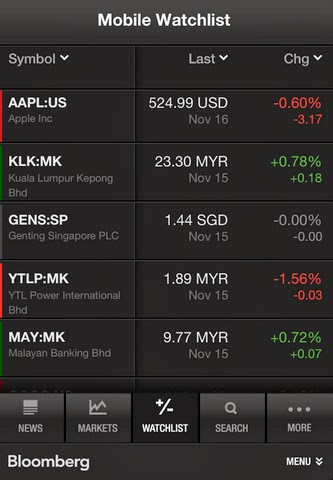
The newer iOS Bloomberg v3 apps looks bad

Which Bloomberg apps (on iPhone/iPod) you prefer?

Bloomberg iOS app v3

Bloomberg iOS app v2

I prefer the older iOS Bloomberg v2 than v3. Sometimes newer doesn't mean better. The color and font size used on the version 2 is much easier to read.

The v3 app try to fit in more information, but please do not forget, the screen size is still (or almost) the same, even retina display is not going to help.

If the original Bloomberg app rating is 5 starts, the newer app is 1 star less.

Sunday, November 17, 2013

Product service decide buying decision (newspaper)

A good example to show service decide buying decision.


My friend told me why he changed his subscription from Oriental Daily News newspaper to Sin Chew. It is just a simple reason, Sin Chew deliver the newspaper much earlier to his doorstep.

Oriental Daily's history is not as long as Sin Chew. Oriental Daily publish everyday including holidays. Sin Chew and a few of the others newspaper publisher didn't published for few selected holidays throughout a year. Publish 365 days is a good service too.

Oriental Daily is a smaller (Berliner) size, about a quarter of the size of traditional newspaper. These days, more people prefer Berliner format, because is easier to hold on hands. This is quite similar with one of the reasons why people prefer theStar and The New Straits Times.

Newspaper is a product. Having a good product is not good enough, because most newspaper publisher provide similar news content everyday. The packaging and service make difference.

What's next?

If faster delivery service is a very important factor, traditional printed paper are not going to compete with online news. The Washington Post (Note: Amazon founder Jeff Bezos to acquire The Washington Post)is a good example, and just a start.

Sunday, July 07, 2013

The missing specification of system design

My friend have his bathroom to be renovated. I ask my friend, did he ask anyone to design the bathroom? He answer no, he says he already have some concept in mind, it will be like a hotel's bathroom, he will be the designer.

After the old tile has been tear down, then new tiles are put up nicely on the wall and floor. The contractor going to install the basin, mirror and shower etc. My friend bought a big and nice basin, just like the one you saw in the hotel bathroom, and is very heavy.

The contractor complains that he doesn't know how to install the heavy and nice looking basin. The basin don't came with a stand, it is too heave to hook on the wall. It suppose to have a concrete cement stand to hold it, but it was not done earlier...

This always happen during system implementation time. When system architecture (or designer) is inexperience, lazy to check for the (hardware and software) specification, too proud of himself/herself to discuss with the software and hardware engineer.

I experience it when setup the hardware (and software) for a project many years ago. Everything just went wrong. The network cable already cramped, but some are just too short, have to order the network cable again. This is just a small issue, and is just a start.

They have ordered the HP servers, but didn't order the rack from HP, but order from third party which is cheaper. The third party rack is very difficult to mount those server on it. Yes, not all rack mount are compatible, they have slightly different in specification and dimension, which cost you 10 times the effort to mount the server on the rack.

They have ordered an expensive backup array, but didn't allocate budget for the backup software. If you are familiar, you should know how expensive an enterprise backup software will cost. The Linux OS that they planned to use, didn't support the backup array. There is no driver for the new hardware! Many more other issues happened.

At the end, all issues have been solved, with extra cost and effort. The system architecture just denied that he/she has done a lousy job on the project. That's life, sign. I learned a lot from that project.

Friday, January 25, 2013

One day Apple online red Friday sales

Is only valid for 1 day, around South East Asia countries. The discount around USD10-100 (RM31-311).

What offer available?


Namepricediscountremark
iPad 3 (with retina display)1,378 (16g wifi)
121The new iPad v2. A6X cpu
1,778 (16g 3g)121
iPad 21,078 (16g wifi)121Only 16g model available
1,478 (16g 3g)121
MacBook AirIvy bridge, Intel HD4000 GPU
MBA 11-inch 64Gb2,788311
MBA 11-inch 128Gb3,088311
MBA 13-inch 128Gb3,388311
MBA 13-inch 256Gb4,288311
AirPort Express26831
Magic Trackpad18831
Apple TV3490No sales
(All prices in RM, Ringgit Malaysia)

Another news. Apple share price "on sales" too. Drop USD63 per share, 12%, about 50 billion market value gone.

Happy New Year 2013

Smartphone not just change the mobile market when iPhone came in in 2007, it also affected the PC market when tablet came in. I just want to cover a little bit the mobile phone market.

Samsung will grab the smartphone market. if you think Samsung already does that, they will grab more out the current market, with their Galaxy S3 and Note II, especially from iPhone.

For those who has not using smartphone now, they still need to take some time to adopt the change. I notice a lot of the existing smartphone users switch to Note II, majority for its large screen display.

Samsung claims that they have sold 5 millions in 2 months time, before the end of 2012. The figure will continue to surge as in 2013.

I just has a feeling that HTC is next SE (Sony Ericsson), SE is next RIM and RIM is next Nokia.

Friday, December 28, 2012

D-Link DNS-320 briefly walkthrough

I was looking for a NAS backup solution for sometime. I am looking for a 4 to 5 bay raid storage, target was Drobo solution,  but was keep away by their pricing. Recently it just came into my mind, why not a cheap D-Link DNS-320 as a temporary solution?

I get a barebone DNS-320 without hard disk for RM 199 (about USD 65). The hard disk cost much more than that.

EOL. This product was phase out on January? 2012 (EOL, end of life). According to the website, EOL means the product is not sold any more. You may consider DNS-320L cloud, which was available at the time I bought 320, price at 50% more (still cheap).

3TB support. If you are interested to use 3Tb hard disk, you might need to check the hardware and firmware version, which will be stated at the bottom of the package box. Mine is H/W version A2 F/W version 2.02. You need firmware 2.02 to support 3Tb, latest firmware is 2.03. Make sure your hardware is upgradable with firmware version 2.02.

Firmware and setup software is available at D-Link support site for DNS-320.

Some people experience the hard disk shown up as 4xxMB capacity, is a common problem. I experienced it as well after the first time system shutdown. I reformat the disk again, but still not sure how it happens. If you were worried, use 2Tb or lower capacity.

Installation and setup. Just follow the installation guide. It should not be a big issue for most people.

Startup/shutdown. There is a small button on the right side of the front panel, press to start up. Press and hold to shutdown. Or you can shutdown from web UI, Menu, Management, System Management, System Settings, Shutdown.

You can schedule your shutdown time for each days as well.

Create share folder. Share folder is the folder that you can see from the Windows file explorer. The NAS will share out the volume without password protection as default, you can disable it and share out other folders with password protected.

To create new share folder, Web UI, Menu, Management, Account Management, Network Shares, New...

Quite a number of user having problem with create new share folder. You need to click on the text to open sub folder, or create new folder.

Click on the text to open sub-folder or create new folder

Select the folder to be share out.

AFP vs Samba/SMB/CIFS. DNS-320 use CIFS/SMB by default. Mac OS X is able to access with smb. OS X Finder Menu, Go, Connect to server... smb://192.168.1.100 (just an example). I would prefer to use AFP (Apple Filing Protocol).

Enable AFP from Web UI menu, Management, Application Management, AFT service. Click enable.

For Linux users, can enable NFS.

Note:
About performance of CIFS/SMB vs AFP, NSF can refer to here. If is not a few times different, I don't really care about which protocol to use. I just prefer to use the native protocol.

BitTorrent. This is another main reason (other than price), why I bought the DNS-320. I don't have to on my PC overnight to do the downloading, if I need to download a big image or software.

Bittorrent can be enable through Web UI menu, Applications, P2P downloads. Once you enable, the system will create a p2p directory under the volume. You can just drop your torrent file in p2p/Torrent directory. The bittorrent application will pick up the torrent file from the directory automatically. If it doesn't, just enable it from the web UI.

UPnP AV Server. Enable UPnP server turn the NAS into a media streaming server. Enable from Web UI menu, Management, Application Management, UPnP AV Server.

Use VLC (I am using version 2.x as example) to connect to the server to stream video file. Windows VLC menu, View, Playlist, Local Network, Universal Plug'n'Play. The media file on your NAS will be shown, it may take some time to refresh. You can play the media file or add to the VLC playlist.

Other features. I just cover 10 to 30 percent of the features. There are more to be explored, but the above already good enough for me, especially for a cheap and affordable solution.