Showing posts with label mobile. Show all posts

Friday, June 02, 2017

A Complain to Maxis Auto Upgrade


Is so much different in Maxis center of today and compare with 9 to 10 years ago.

About 10 years ago, I walk in to Maxis center, check for any offer for cheaper package than the 30 per month that I was having. Might not be something cheaper but may be more free calls. The attendance was so nice, help me to scan through my bills, so that he can suggest a mobile package for me.

I recall, even Digi has a similar service at that time, they advertised that mobile subscriber can go to their service center, their expert will find out what is the suitable package for the subscriber.

My mobile package is very old, is so old that the Maxis center people there don't even know there is such a pakcage, until they check through the computer. They told me the call rate is expensive, is not available anymore. They also told me that under rule and regulation, they have to keep the package as long as there are subscribers still subscribe to it. It make sense for me.

The Maxis expert (I am not sure he is the expert, but he do his job quite weell) scan through my bill and told me, even though my existing call rate is more expensive, but with my using habbit, the package that I was subscribing is the cheapest for me.

I keep using the 30 per month package. Later there are some better (sound better) packages like Surfmore 30. Same price, but with more (300(?) minutes) free calls. I was busy and lazy to walk in Maxis center to change my subscription package. I am happy with my existing package as long as it doesn't exceed my budget.

Recently Maxis 'upgrade' those old packages to a new one with added price. You can read from the discussion forum in lowyat.net here. They give extra data, but the price will generally increase from 30 to 38.

I walk in to Maxis center to file a complain. My argument is:
1. Maxis shouldn't change my package without my approval. Maxis argue that it is an upgrade.
2. Maxis can add in data for my subscription package, but Maxis shouldn't increase the price.

The customer service refuse to file a complain for me, until I told him that the Maxis CEO apologize last year which results from some unhappy customers. They promise to call me back and they didn't.

I look back to last year (April) incident again. As Maxis give special offer to those who want to opout from Maxis and switch to other mobile service provider for better package. Those loyal customers with Maxis for many years were not given the offer. When customer call in for the offer, Maxis reply is only selected customers are given for the offer.

The post about the incident came out on the social media, Maxis try to ignored it, and is like snowball getting bigger and bigger. You can read the story from here and here, Malaysians are angry with Maxis. You can find many other related posts.

I summerize a few points from the post, what went wrong:
1. Too much of delay for an official response
2. The solution provided misses the main complain completely
3. Attempts to explain things from the telcos point of view (and not at the customer point of view)

After 12 months time, I experience the same things. Not much improvements.

I look at the live video from Maxis (here), the Maxis CEO Morten (Morten Lundal) appearred to be impatient and not sincere at all.

Tuesday, May 27, 2014

Virtual Machine on ARM CPU

The 2 virtual machine software (VMWare and Virtualbox) that I know runs on Intel x86 architecture. This sounds reasonable, as most popular operating system software runs on x86. Windows, Linux, Mac OS X (10.5), Solaris are all available on x86 cpu architecture platform. Simulator for ARM like armware is in working process, new virtual machine software for ARM should be coming soon too.

What is a virtual machine? What is it use for? Virtual machine (VM) is a software platform which simulate the computer hardware (cpu, memory, hardware storage and I/O etc.), to allow different operating system running at the same time on the same machine. VM simulate as many standalone computer hardware on a single machine, as long as you have enough hardware resources to support it.

Simulation software are normally slow and use a lot of resources. As hardware technology improve, and price getting cheaper and cheaper, a newer personal computer machine is much more powerful than an older server.

As virtual machine software technology improve from time to time, the performance of the software running on virtual machine is closer to the software performance running on native platform. The using of the virtual machine software came with many advantages.

There are many advantages with using virtual machine. With virtual machine, you can run a different operating system software on the same machine. For example, you can setup 2 operating system on the same machine, 1 for development, another 1 for testing. You can easily setup the software environment on the virtual machine by backup, copy and restore the VM image. With virtual machine, testing and server management are much easier.

Current iOS and Android runs on ARM cpu platform. As mobile environment getting more popular, ARM cpu are getting more powerful and more popular too, improve with multi-core and moving to 64 bits. Apple is pushing its mobile cpu to 64 bits with A7 cpu, other competitors like Samsung and Qualcomm will follow as well.

AMD is trying very hard to include ARM cpu in their hardware platform (read here), not sure AMD is pushing ARM into their server platform. There are rumors that Apple is testing ARM cpu for their notebook actively.

CPU performance is not the only benchmark, power consumption is the area where ARM cpu out perform the Intel cpu. Apple notebook will equipped with ARM cpu, sooner or later, then a virtual machine for ARM will exist.

Saturday, May 03, 2014

The Evolution of Homepage

Since we have world wide web, every personal and companies want their own homepage, for branding and marketing. A the beginning, we create our own homepage with html.

In web 2.0, we do blogging. Blog updates from time to time, it is more interesting than the static homepage which only update quarterly or once a year. The micro-blogging expand blogging to the mobile world.

Later we build "fan page" as our homepage on Facebook, as Facebook has a community base users. It is more effective to have a fan page as the homepage.

Now in the mobile world, we don't create html homepage. We create mobile apps for branding and marketing. So what's next?

Friday, April 18, 2014

365 Millions Traffic Information Failed

The Malaysia ITIS (Information Transport Information System) has failed with RM365 millions, now need another RM200 millions to revive the project. The project was started in year 2002 by the federal government to solve the congested traffic issues.

I do not have the full details of what ITIS trying to do, to solve the traffic issues. I don't ITIS will includes the traffic light control system. It is just a real-time traffic monitoring system. I have blogged about the ITIS website many years ago, check here.

The system failed for many reasons, some can be summarise as "vandalism and obsolete technology".  It was reported that only 30 cameras out of 1000 plus cameras are working. What a shame.

I look back my own post back in year 2008. I think providing real-time video online is just a waste of bandwidth. Photos should be good enough, even a text-base traffic status is good enough for the drivers, a status of smooth, moderate or heavy traffic.

If what was doing the pass is not working, the related parties should redesign another solution for the traffic monitoring system. If it doesn't came out with a better solution, another RM200 millions is just a waste on the project. Adding alarm system to the CCTV cameras is not a good solution.

Out of idea? Take a look at Waze. Waze is a community base mobile apps which navigate the drivers. Waze show drivers the route to the destination, and it can avoid heavy traffic if possible. Traffic monitoring system is already on the smart phones.

Reference:
Guan Eng: Additional RM200m on failed transport system waste of public fund
Failed Traffic Surveillance, theStar

Thursday, March 27, 2014

WebCamp KL Internet of Things

WebCamp KL is LVL KL now
WebCamp KL changed it's name to LVL KL (Level up KL?), each speakers has 18 minutes to talk.

The kickstart for 2014 event is on 27 Mar, Internet of Things (IoT). The speakers are Ikhwan, Mike Smith, Swee Meng, Calvin Tee, Chern Shue and Sathyvelu K.

Below is my version of the summary. I pick up those content that I like, and add-on a little bit.

What is the Internet of Things (IoT)?
Connect all devices, other than PC and mobiles to the Internet. Common examples are TV, refrigerator, less common example is temperature sensor to report temperature to the internet.

Ikhwan shares what he saw at Mobile World Congress 2014. The use of NFC, sensors used in cars, and android wear.

How can we build our own IoT?
Swee Meng brief on the hardware available like Arduino, Raspberry Pi, BeagleBone etc. Calvin Tee shows a live demo on remote control the room lighting through network. The lighting device is build with Tiny85 chips (which cost $2 USD only), can be programmed with Arduino software.

What is Arduino?
Arduino is a low power microcontroller, it connect to sensors, can be easily programmed by Arduino Software. Arduino is open-source platform, the hardware circuit design is freely available. It means anyone can use the design and manufacture their own arduino.

Use Arduino to build Segway


Arduino vs Raspberry Pi
Raspberry Pi is a low cost credit card size PC board. It doesn't have hard disk, but use SD card as external storage for OS system and data. Raspberry Pi can be used as a microcontroller like Arduino, to connect sensors, but many people use it as a PC eg. make it into a media streaming box.

The different for me is, Arduino is much simpler, but it is slightly more expensive than Raspberry Pi. For Arduino UNO, the cheapest you can get is about USD29, but it doesn't come with ethernet port. Raspberry Pi price is USD25 for version A, USD35 for version B.

BeagleBone Black vs Raspberry Pi
BeagleBone is a low cost, credit card size pc board like Raspberry Pi, BeagleBone Black price is close to Raspberry Pi (still a little bit higher). BeagleBone is open hardware, but Raspberry Pi is not.

Personally I still prefer Raspberry Pi as it has a better software support. Raspbian is a debian linux optimize for Raspberry Pi hardware.

ATtiny85
ATtiny85 microcontroller is from Atmel. You can program ATtiny85 with Arduino Software like you are programming with Arduino. ATtiny85 is very limited compare with Arduino, but very much cheaper as well. ATtiny85 is about USD $2-$3 compare with Arduino UNO cost USD29. As the lighting device shown by Calvin Tee, he just need a ATtiny85 will do.

How to shrink an Arduino project to ATtiny85? Refer here.

How IoT apply to our life?
Sathyvelu K. shows us the Nest thermostat.


Some of you might already heard of Nest, it was created by Tony Fadell, the engineer who created Apple iPod. Google acquired Nest for 2.3b USD in January 2014.

Superpedestrian
Copenhagen wheel is superpedistrian now. It is a rear bicycle wheel, it works together with your smartphone apps. It learns how you cycle, and the electric motor will kick in automatically when you cycle uphill.


I find this interesting, it doesn't change a lot to the existing system, but with little modification, it improve with today's technology. But I doubt the Copenhagen wheel can be easily installed on all bicycle.

Thermostat and bicycle is not that common in Malaysia here, and people already done it. What else we can do here?

Home appliance
Chern Shu gave a good example. Many household installed with alarm system, many have auto gate as well. But the auto gate system don't talk to the alarm system.

I think you can build a "Nest" for alarm panel, or build a TV set top box as the hub of all the home appliance devices.

What was missing?
What was missing in the IoT talks? No one talks about protocol. When you connected all devices together, they need to communicate with each other. How your alarm controller knows the auto gate has open for more than 5 minutes? You need a protocol, a protocol like MQTT-SN.

Thursday, February 20, 2014

Facebook to acquire WhatsApp in USD16 billion

Finally WhatsApp is ready to sell for a price. In the 16 billion deal, 4 billion are in cash. According CNET WhatsApp monthly active users more than Facebook, in terms of growing rate since they start up. This is not truly fair comparison as both company started at different time. In simple word, WhatsApp is growing fast, For Facebook, WhatsApp is rival. By acquiring WhatsApp, Facebook increase their user base and one thing less to worry about.


Photo from flickr

Does WhatsApp has a business model? Yes, the first year is free, but the subsequence subscription fee is USD1 per year. WhatsApp is just a small size company with 55 employees now. WhatsApp has more than 400 million monthly active users.

Last year there was a rumour that Google and WhatsApp in talk of acquisition, but WhatsApp has denial that (refer here Won't sell-out to Facebook or Google: WhatsApp). WhatsApp never need to worry about money, they were funded 8 million by Sequoia Capital, should be enough for them to operate for some time.

There is a story of how Koum and Acton co-founded Whatsapp. Koum and Acton working in Yahoo before the co-founded WhatsApp. Both of them applied job in Facebook but rejected. Read the story here.

Note:
Rumor saying that Google offered 10B for WhasApp.

Saturday, December 21, 2013

Maxis Hotlink Free Internet Prepaid 2013

This is quite an innovative plan for free mobile Internet.

Hotlink is Maxis prepaid. It came out with a new prepaid with free Internet. How can it be free? You can not surf in full speed, only at 64kbps. What you can do with 64kbps? Whatsapp, WeChat, facebook etc. There are review saying that Waze can be used as well, but I have to try out the speed performance. (Note: You can subscribe to unlimited Waze for RM1 per day)

You still need to top up the prepaid card, but there is a 50 days of de-active period that you still can use the Internet surfing.

Active and de-active period. After you top up, is the active period. Active period depends on how much you top up, example RM5 active for 5 days. After active period end, you can receive call and sms, but not call out or sending sms, this will be the de-active period. This Hotlink free Internet has a 50 days of de-active period, you can not send SMS, but you are still able to access to Internet. That means you can send Whatsapp with these 50 days without top up.

 [ Top up | -- active period -- | -- de-active period (50days) -- | card expired ]

To prevent the card from expired, you have to top up before de-active period end. Once the card expired, you can not top up anymore. During de-active period, your balance will be freeze, but it will be carry forward to the next top up.

Cost for free mobile Internet. Ideally with 5 active and 50 de-active period, you only need to top up 7 (365/55) times x RM5 per year. Which cost RM35 per annual for 365 days free surfing. The RM35 will still stay in the account balance. Compare with Super Long Life 365 and Validity 365. These are long validity period which cost about RM30 a year. The Hotlink free basic Internet doesn't sounds that bad.

Auto top up. Most people will forgotten to top up every 55 days (so do I). You can subscribe a monthly auto top up, check the detail here.

Subscribe full speed Internet plan. What do you do will all these balance? You still can subscribe to a full speed data plan like RM2 for 100Mb Daily (not auto renew), detail check here. This package is for light users who want to save money but still want to access Internet.

How to get it? You can purchase the new card or existing Hotlink users can change their current plan to this Free Internet Plan. Hotlink Extra/Basic/SMS/Talk Plan/ Hotlink 2.0 & 3.0 can change to Free Internet Plan, excepts Hotlink Youth Club, Hotlink Campus Edition, Hotlink Broadband, Hotlink Sabah/Sarawak/Terengganu/Kelantan Plan. (Wow! I didn't notice there are so many Hotlink)

The key will be the 64kbps. Will 64kbps enough for Whatsapp and facebook? I will let you all know if I have the change to try out.

Monday, December 09, 2013

Digi Super Long Life 365 2013

Super Long Life 365 package cost RM30 (as for now) to validate you number for 365 days. The RM30 will be deducted from the balance and will not converted to talk time.

Digi prepaid has 3 choices, best, easy and smart. Best for call, easy for internet, smart for both.

The confusion part is there are 2 best plan. One is the old DiGi Best Prepaid Hit RM1, another 1 is New Digi Best Prepaid.

The new Digi best prepaid is take effect on December 2012.

To check current plan:
*128*1*4#
"DiGi Best Prepaid Hit RM1" (old)
"New DiGi Best Prepaid" (new)
(There may be some older prepaid package, but I have no idea what will be the package name)

Check is super long life 365 is available for you: *128*1*7#, reply 3 (Super Long Life):
1 RM5 (30 days)
2 RM30 (365 days)

The super long life 365 is not with the DiGi Best Prepaid Hit RM1 anymore, you must upgrade to "New DiGi Best Prepaid" to enjoy the service.

How to subscribe after switch to New DiGi Best Prepaid?
To activate DiGi Super Long Life via *128#:
Step 1: You must have at least RM35 in your account. (*126# check balance)
Step 2: Dial *128# and then press call.
Step 3: Reply 1 for My Account.
Step 4: Reply 7 for Talktime Services.
(You can use the shortcut code to dial, but since the menu may change, You might choose the wrong option)
Step 5: Reply 3 for Super Long Life.
Step 6: Reply 2 for Super Long Life RM30 (365 days).
* In 2012. There was only 1 option. Reply 1 for Super Long Life 365.
Step 7: Press 1 to confirm that you have selected RM30.00 with 365 days validity.

Tuesday, December 03, 2013

Backup mobile phone data

I heard 2 cases of phone lost recently. One backup the data, the other one just lost the precious photos on the phone. I always remind my friends:

Backup your data on the mobile phone!

Backup everything
How? The easiest way is backup everything with the desktop software. For iPhone you can sync all the data to iTunes software. I suggest do it everyday, just connect your iPhone to the desktop PC iTunes software, click the sync button. At the same time it will charge your phone.

Even old Nokia phones has Nokia PC Suite, or the later version call Nokia OVI Suite (or Nokia Suite). Sony Ericsson has a PC Suite, as well as Android. I have not used the Android PC Suite before.

I bet most normal users who doesn't know how to backup the mobile phone data, do not use any software that I mention above. I suggest to backup to the Internet cloud, I will show you how.

I just choose to backup contact list and photos as an example.

1. Contact (or address book). Link your contact to the Internet, for example Gmail contact. Android is Google friendly, it should automatically sync to Gmail contact.

iPhone contact to Gmail
Connect to gmail using CardDAV. Google has a support page on how iOS sync gmail contact. Different version of iOS may have some minor different in configuration.

iPhone > Settings > Mail, Contacts, Calendars > Add Account... >

Choose any prefer service

Choose an account and follow step by step will do.

Then set Contacts default account to Gmail or the service name you set above (not On My iPhone), so all your new added contact info goes into cloud service and not on local iPhone.

iPhone > Settings > Mail, Contacts, Calendars >

Set default account to Gmail.

2a. Photos to Dropbox. Most users (include Android and iPhone users) should be able to sync photos to Dropbox. You must have a Dropbox account (free register) and you need to connect your phone to a desktop (or notebook to do that).

(iPhone users can turn on iCloud sync in step 2b. You don't need a PC to do that.)

Once you have installed the Dropbox software, connect the phone to the desktop. A screen will display, just click import will do. Select auto import, so your photos will be sync to Dropbox automatically the next time you connect the phone.


2b. iPhone iOS sync to iCloud. You need iOS 5 or later. iOS will sync your photo stream to iCloud automatically when you connect to Wifi.

iPhone > Settings > iCloud > Photo Stream > (set On)

Once activate, you can check your iCloud photo stream from iPhone > Photos > (Photo Stream button at the bottom)


This is just a very brief guide to back up your phone data. Hope it helps you.

Tuesday, November 26, 2013

Secret Recipe offer with WeChat 2013

As celebration of 16th anniversary, Secret Recipe (Malaysia) has a buy 1 free 1 offer through WeChat. You can buy 2 slices of Secret Recipe cake with price of 1 (the higher price if the 2 cakes have different price). The offer is from 16-30 November 2013.

Coupon offer through WeChat

WeChat (微信) is a mobile messenger software from Teccent, to compete with Whatsapp and LINE. WeChat just started with 2-3 years time, with aggressive marketing campaign, WeChat users grown rapidly. WeChat reported to have 300 million users early this year 2013.

WeChat is not just for messenger. WeChat try to include (almost) every function of the other web services into this mobile application. This buy 1 free 1 offer is similar with coupon.

How to get the offer?

The coupon will valid for 1 hour time after activated. Only activate before purchase.

1. Subscribe to Secret Recipe from WeChat
On iPhone for example. WeChat > Contacts > Add > Official Accounts > Search "Secret Recipe" > (Select "Secret Recipe M'sia") > Follow.

2. Activate coupon
WeChat > Contacts > Subscription Accounts > Secret Recipe M'sia > Look for "Secret Recipe Sweet 16th Anniversary Buy 1 Free 1.

Once activated, the coupon will valid for 1 hours. Just show the code to the shop.

WeChat is very aggressive with their marketing. WeChat includes many other features other than just messenger. This coupon feature is just a start, e-commerce and mobile payment will be added in WeChat. WeChat will become a common platform for all mobile services, even I feel is too ambitious for a mobile app to do that.

This coupon offer will be a good promotion for both Secret Recipe and WeChat.

Saturday, November 23, 2013

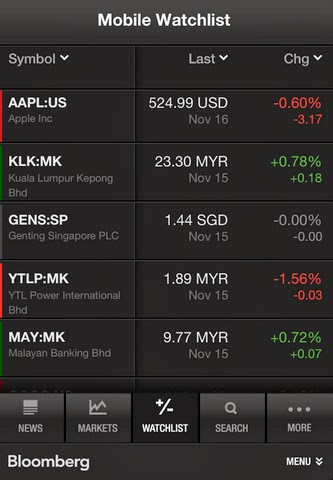
The newer iOS Bloomberg v3 apps looks bad

Which Bloomberg apps (on iPhone/iPod) you prefer?

Bloomberg iOS app v3

Bloomberg iOS app v2

I prefer the older iOS Bloomberg v2 than v3. Sometimes newer doesn't mean better. The color and font size used on the version 2 is much easier to read.

The v3 app try to fit in more information, but please do not forget, the screen size is still (or almost) the same, even retina display is not going to help.

If the original Bloomberg app rating is 5 starts, the newer app is 1 star less.

Friday, January 14, 2011

The new mobile community website

Latest community website don't build on web. They build on mobile.

Users register, access through mobile platform (iPhone, Android). Store photos at third party website like flickr, Instagram... Status and blog through twitter, finally publish to Facebook.

Users may not need to access to the website. A few good examples of the new mobile community website will be Whatsapp, Viber, Instagram (and more will come). Location base website like Gowalla and foursquare has a web version, but most of the time, users access through the mobile platform.

Whatsapp is a mobile application (available on iPhone, Android and BlackBerry), allow users to send SMS (to another mobile application) for free. Viber is the audio version of Whatsapp. Both application register through mobile platform, access the contact list and build a community.

Instagram is a photo sharing community on iPhone. You take a picture, add a filter to it, and share it out through other community website like flickr, facebook, twitter and etc.

Everything just done on mobile application, cooperated with other website to build a bigger community. New community website don't really need a website access anymore.